Review Colors
The worksheet colors are designed for review:
| Status | Color | Meaning |
|---|---|---|
OK | Green | Code read correctly. |
PARTIAL | Amber | Some fields could not be found. Review this row. |
AMBIGUOUS | Orange | The scan can be interpreted in more than one way. Check the medicine box. |
UNPARSED | Gray | The scan could not be decoded. Check the scanner input or enter manually. |
UNPARSED does not mean the medicine code is invalid. It means this tool could not decode the string into PC, SN, LOTE, and CAD.
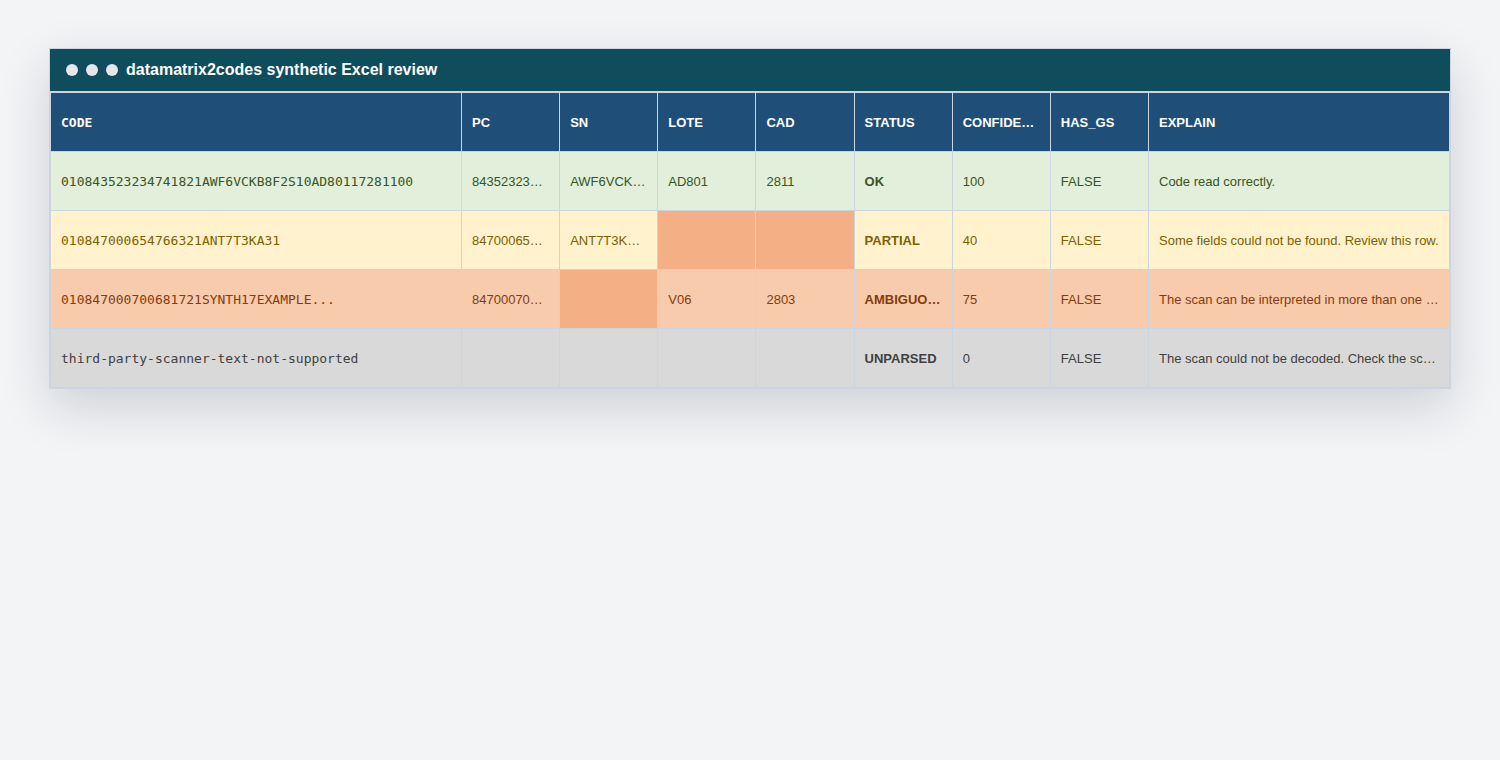
Use EXPLAIN to understand the action for a row. For full raw scanner strings and parsed outputs, see Example Codes.
Why Ambiguous Rows Exist
An ambiguous row is not a software error. It means the scanner-to-Excel string no longer contains enough boundary information for a guaranteed answer.
For example:
...21SYNTH17VALUE1728110010AD801
The 17 inside SYNTH17VALUE may be part of the serial number, while the later 17 may mark the expiry date. If the original hidden separator is missing, the software may not be able to prove the boundary from the flattened text alone.
When that happens, the row is colored for review and disputed fields are left blank.