
For pharmacy scanner workflows in Excel
Turn Spanish medicine box scans into PC, CAD, SN, and LOTE columns.
Download one Excel macro file, import it into a workbook, and scan medicine boxes into column A. The macro fills the pharmacy fields and colors rows so pharmacists know which scans are ready and which need checking.
Medicine scan review in Excel
| CODE | PC | LOTE | STATUS |
|---|---|---|---|
| 010843... | 8435232347418 | AD801 | OK |
| 010847... | 8470006547663 | PARTIAL | |
| 010847... | 8470007006817 | V06 | AMBIGUOUS |
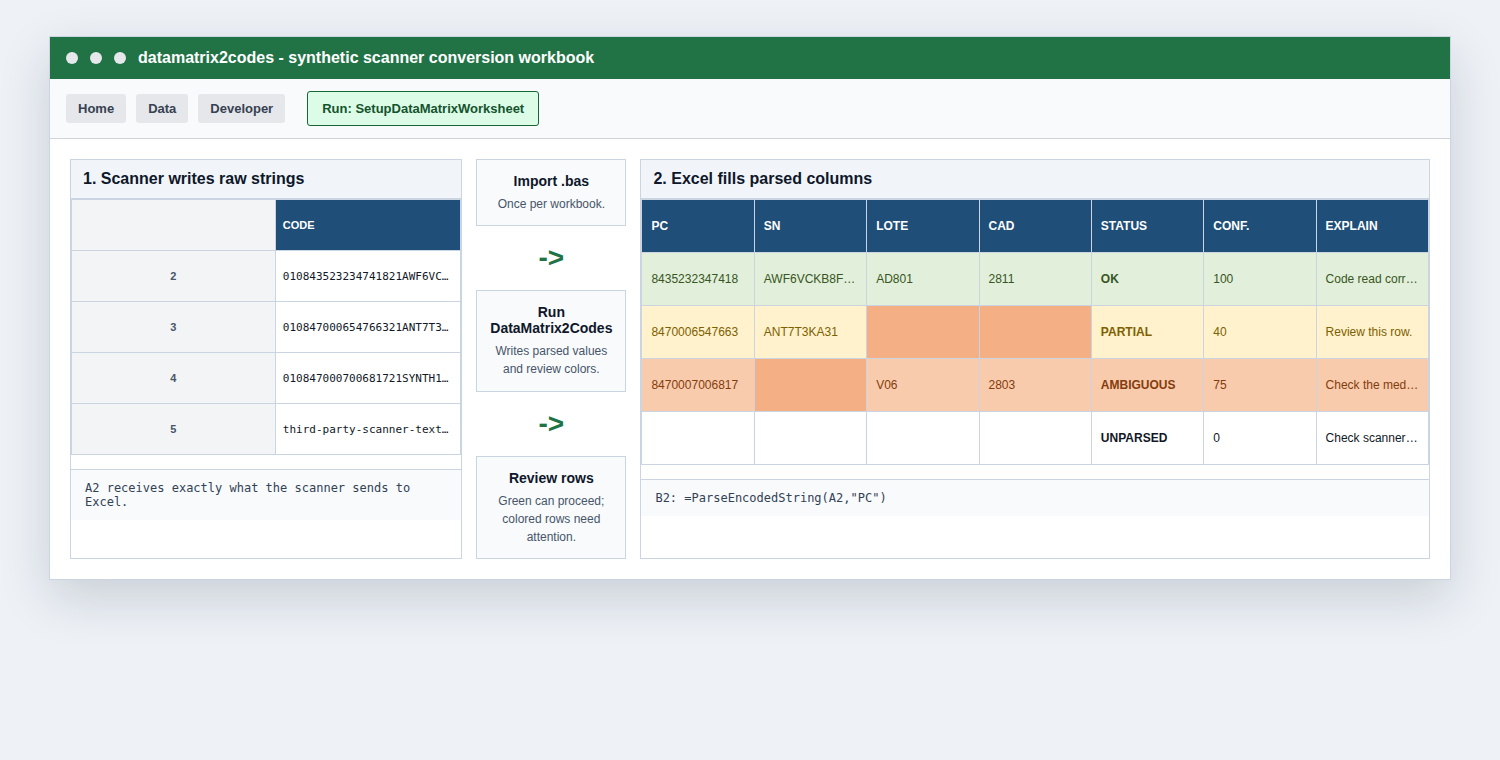
Raw scanner strings in Excel become parsed pharmacy columns with review colors.
Start here
Use it in Excel
Download one .bas file, import it into your workbook, scan medicine boxes, and run DataMatrix2Codes.
DownloadGet the Excel macro
Excel users only need ParseEncodedString.bas. The full repository is mainly for developers and tests.
ReviewKnow which rows need checking
Green rows are ready. Amber, orange, or gray rows need the pharmacist to check the box or scanner input.
InstallImport into Excel
Step-by-step instructions for Excel on macOS and Windows.