Overview
datamatrix2codes is an Excel helper for pharmacy scanner workflows.
Pharmacy staff scan Spanish medicine boxes into Excel. The macro turns the raw scanner string into the fields pharmacists expect to see: PC, CAD, SN, and LOTE. It also colors each row so it is clear whether the scan is ready or needs checking.
I originally built this to help my sister, who is a pharmacist, work with scanner output in Excel. The goal is practical: make DataMatrix scans easier to review without asking pharmacy staff to use developer tools.
What It Does
- Download the single Excel module file:
ParseEncodedString.bas. - Import it into an Excel macro-enabled workbook.
- Scan medicine boxes into column
A. - Run
DataMatrix2Codes. - Review the generated
PC,CAD,SN,LOTE,STATUS, andEXPLAINcolumns.
The normal user does not need Python, the command line, or the full repository.
Spanish Pharmacy Terms
In Spain, medicinal product packaging commonly uses these labels around GS1 DataMatrix codes:
| Label | Spanish term | Meaning |
|---|---|---|
PC | Código Nacional | National Code. Identifies a specific drug product in Spain. |
CAD | Fecha de Caducidad | Expiry date. Returned by this tool as YYMM. |
SN | Número de Serie | Serial number. Used for pack-level serialization and traceability. |
LOTE | Número de Lote | Batch or lot number. Used for manufacturing and recall traceability. |
What The Box Shows
People often call the square code on a medicine box a "QR code", but on Spanish medicinal product packaging this is normally a GS1 DataMatrix symbol, often described in Spanish as a matriz de datos. The camera or scanner sensor may be perfectly capable of capturing it. The important difference is the decoding software, firmware, or app configuration: it must preserve the GS1 structure that separates the fields.
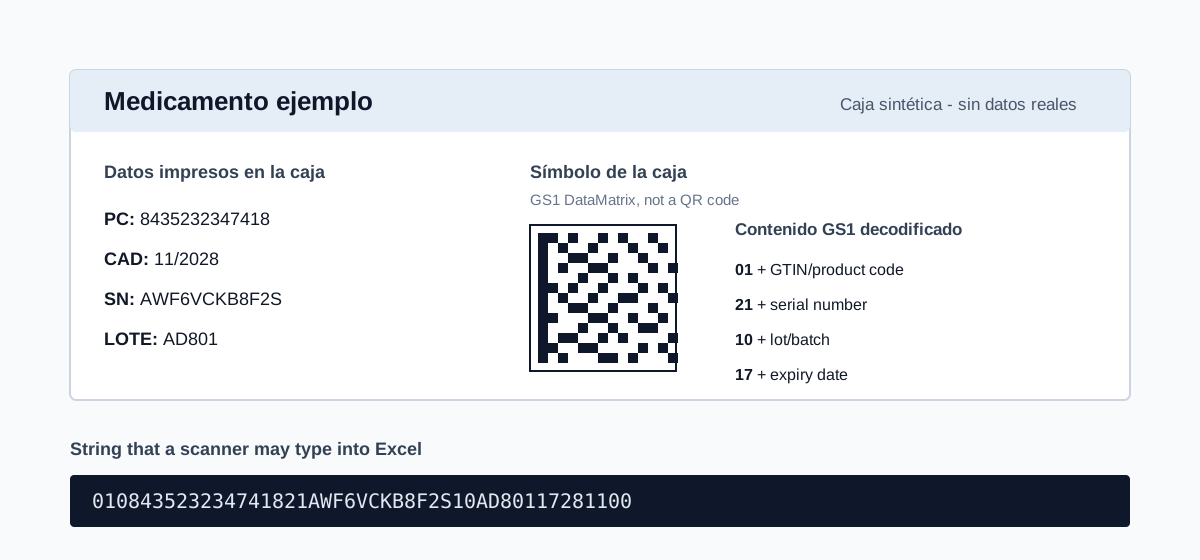
The scanner reads the DataMatrix symbol and sends a string to Excel. It does not read the printed PC, CAD, SN, and LOTE labels as four separate lines.
The Real Problem
The scanner reads the DataMatrix symbol, not the printed text next to it. The decoded payload is one GS1 string. It is not four separate values; it is a sequence of Application Identifiers and values.
The failure mode this project targets is interpretation ambiguity. For example, 17 can mark the expiry-date field, but the same digits can also appear inside a serial number. The parser has to decide which occurrences of 01, 17, 10, and 21 are field starts and which are part of a value.
The usual path is:
- The box has printed labels plus a GS1 DataMatrix symbol.
- The scanner decodes the symbol and types a one-line string.
- Excel receives that raw GS1 payload string.
- The parser extracts fields and highlights uncertain rows.
Variable-length GS1 fields such as serial number (21) and lot (10) are the difficult cases. Their values can be followed by more fields, and their values can contain the same digit sequences used to start other fields.
Some raw scanner strings are genuinely ambiguous. This is not a weakness of one scanner or one parser. If more than one GS1 interpretation fits the same text, the software should not silently invent certainty.
Ambiguity Example
Consider a flattened scan fragment:
...21SYNTH17VALUE1728110010AD801
There are two plausible readings:
| Reading | Meaning |
|---|---|
21 SYNTH17VALUE then 17 281100 | 17 inside SYNTH17VALUE is part of the serial number; the later 17 starts expiry. |
21 SYNTH then 17 VALUE... | the first 17 might be treated as the start of another GS1 field, but the following value may not make a valid expiry. |
If an explicit separator is present in the scanner string, the boundary is easier to parse:
...21SYNTH17VALUE<GS>1728110010AD801
Here <GS> is documentation notation for the GS1 group separator character. SEVeM's scanner validation sheet shows the same idea as visible GS; depending on scanner configuration, Excel may show GS, <GS>, ', |, another replacement, or nothing visible.
The parser uses GS1 rules and scoring to choose a confident parse when it can. If plausible readings still disagree, it returns AMBIGUOUS and leaves disputed fields blank instead of inventing a value.
What The Software Provides
The project provides:
- An Excel VBA module for the pharmacy workflow.
- A Python reference parser for batch conversion, tests, and CI validation.
The parser returns fields plus review columns:
| Field | Meaning |
|---|---|
PC | Código Nacional / normalized GTIN |
SN | Serial number |
LOTE | Lot or batch number |
CAD | Expiry as YYMM |
STATUS | OK, PARTIAL, AMBIGUOUS, or UNPARSED |
CONFIDENCE | Numeric confidence from 0 to 100 |
HAS_GS | Whether the scan contained a GS1 group separator |
EXPLAIN | Short review message |
Start here: