Device Catalog
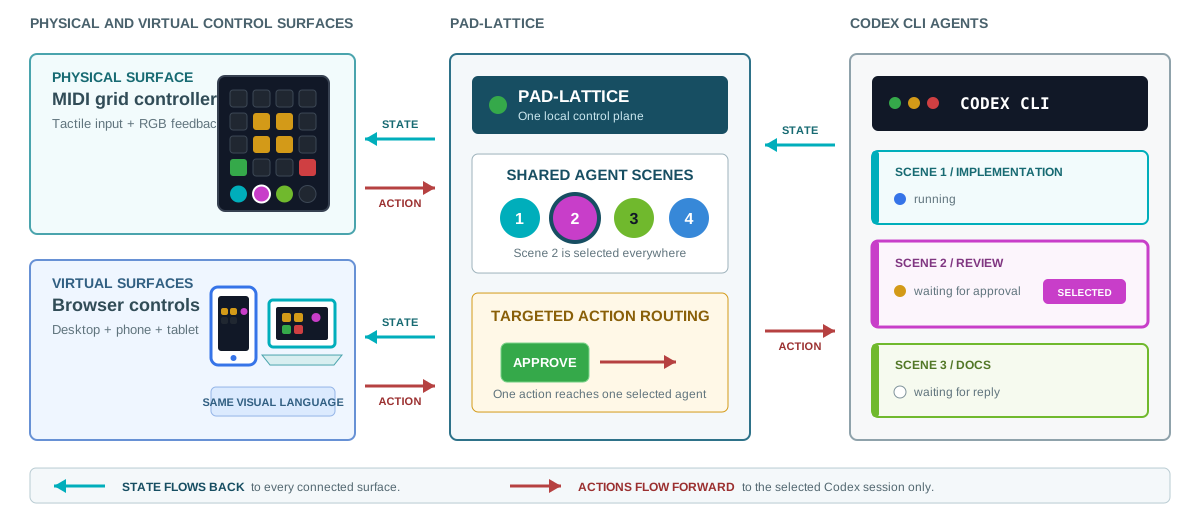
Choose how you want to see and control your Codex CLI sessions. No MIDI hardware is required. Start with How It Works for the shared workflow; the entries below explain each surface's setup and layout.
Already own hardware? Go directly to Novation Launchpad or Elgato Stream Deck (experimental plugin).
Virtual Surfaces
| Surface | What it does | Status |
|---|---|---|
| Desktop Pad | Connect existing Codex CLI chats and use the pad on your computer. | Linux and macOS |
| Phones, Tablets & Browsers | Pair a browser to the running bridge and control the same sessions. | Live control; trusted-network access requires pairing |
| Public Playground | Watch the Demo, try Sandbox, or play Show without installing anything. | Simulation only; no connection to real agents |
The desktop app also manages the local service. Browser surfaces can connect to it or to the independent CLI service.
Physical Controllers
| Controller | Layout | Status |
|---|---|---|
| Novation Launchpad Pro Mk1 | Shared 8x8 grid, top action rail, right-side session selectors | Supported: physically tested |
| Novation Launchpad Mini Mk3 | Same visual layout, model-specific MIDI profile | Experimental: hardware testing needed |
| Novation Launchpad Pro Mk3 | Same visual layout, model-specific MIDI profile | Experimental: hardware testing needed |
| Elgato Stream Deck (15-key) | Eight Session keys and separate actions | Experimental; hardware testing needed |
| Elgato Stream Deck XL | Eight Session keys and separate actions, 32 keys total | Experimental; hardware testing needed |
| Elgato Stream Deck Neo | Eight sessions across two pages, with actions on each | Experimental; hardware testing needed |
For hardware, supported means physically tested; experimental means an implementation exists but still needs an owner's test. These are Pad-Lattice integration statuses, not manufacturer certifications. Each entry explains requirements, installation, and limitations.
Add a MIDI Profile
Built-in Launchpad profiles are included with Pad-Lattice; there is nothing to download separately. For a new device, obtain a profile from a trusted author and validate it using the CLI:
pad-lattice profile validate ./controller.json
This checks the file without opening MIDI ports. It does not prove the mapping is correct for your hardware. A profile may send MIDI and SysEx commands.
To install it, place the JSON file under
~/.config/pad-lattice/profiles/ (or $XDG_CONFIG_HOME/pad-lattice/profiles/
when configured), then restart Pad-Lattice. Its unique profile ID will appear
in the MIDI profile list. Existing IDs cannot be silently overridden.
For a one-off trial without installing the file:
pad-lattice demo --profile-file ./controller.json
Disconnect any running MIDI surface first so two processes do not compete for the controller. See Device Profiles for authoring and Device Testing for the guided verification procedure.
Request or Contribute a Device
Open a device request with the exact model, available controls/displays, programming documentation, OS, and whether you own it and can test. Existing profile authors can submit a pull request with the profile and a guided test report.
MIDI profiles are data; plugins are executable software. Importing a JSON profile cannot add a new USB protocol or install a Stream Deck plugin. A device outside the existing MIDI driver needs a reviewed adapter and separate setup instructions. Contributions must preserve the existing meanings of colors, glyphs, selection, and enabled actions.