Overview

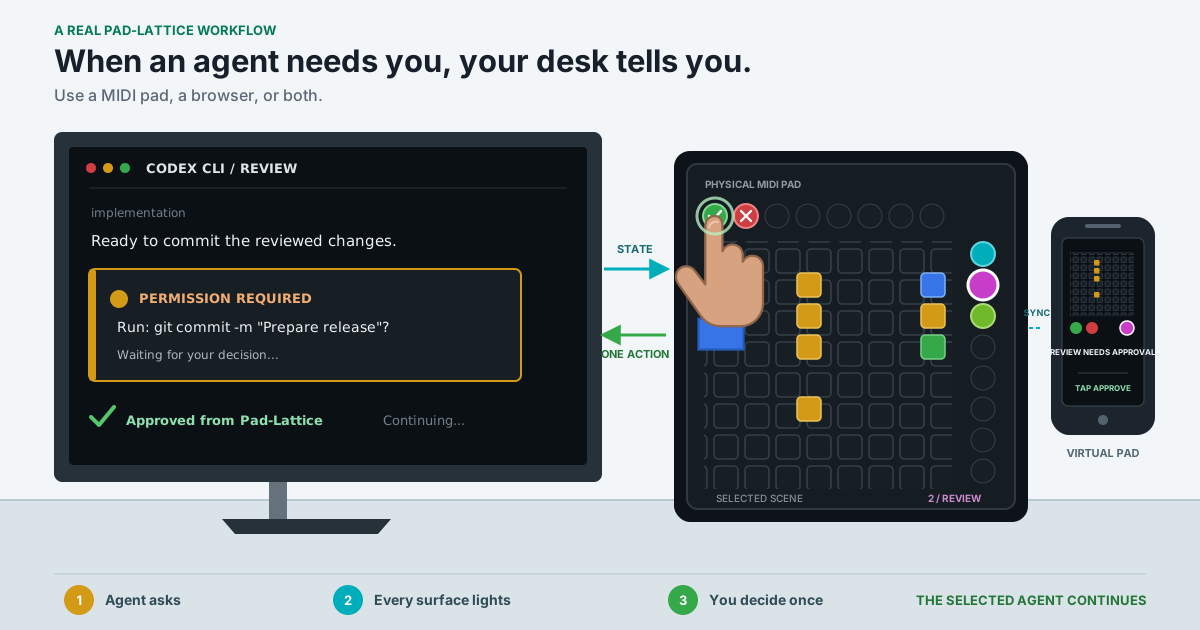
Pad-Lattice is a human-in-the-loop control surface for monitoring and directing multiple AI agents. At a glance, it shows which session is working, waiting for a reply, requesting approval, completed successfully, or failed. When an action is available, illuminated controls route it only to the selected agent.

The same tactile visual language runs on physical Novation Launchpad MIDI controllers and a Virtual Pad in the browser, so anyone can use it from a phone, tablet, or computer, with or without MIDI hardware.

A Codex approval request lighting physical and virtual Pad-Lattice surfaces before one human decision returns to the selected agent

Open the human workflow illustration at full size.

Visual Protocol 1

Color, shape, position, brightness, and motion communicate agent identity, state, selection, action availability, and capacity. Their meanings remain consistent across physical and virtual surfaces.

Changing that grammar is a protocol decision, not cosmetic restyling.

Start Without Hardware

Open the public virtual pad to experience a simulated multi-agent approval and retry flow, explore every protocol state in the sandbox, or play the full-surface audiovisual Show.

The public page is a simulation and never connects to a local agent. To control real Codex CLI sessions, install Pad-Lattice and run:

pad-lattice web

Use pad-lattice web --lan to pair a phone or tablet on the same trusted local network. See Connect a Phone, Tablet, or Laptop for a step-by-step guide, including multiple devices and Parallels Desktop.

Why MIDI Still Matters

MIDI hardware already combines tactile input, RGB feedback, low-latency local communication, and mature operating-system support. Pad-Lattice repurposes those strengths beyond music instead of requiring custom AI hardware.

The browser provides the control surface without MIDI hardware. A Launchpad adds tactile controls and LED feedback, and both surfaces can run at once:

pad-lattice daemon --web

What It Supervises

Pad-Lattice does not inspect model internals or decode tokens. It answers operational questions:

  • Which agent is selected?
  • Is it running, waiting, successful, failed, or requesting approval?
  • Do any background sessions need attention?
  • Which actions can a live integration consume now?
  • Which exact agent and request will receive a press or tap?

Prompts and terminal output stay in Codex. A browser receives sanitized labels, semantic states, selection, and action availability only.

Choose Your Path

I want to...Start here
Experience the idea immediatelyTry the virtual pad.
Control Codex without MIDI hardwareControl Codex.
Pair phones, tablets, or laptopsConnect a Phone, Tablet, or Laptop.
Use a LaunchpadQuick Start.
Run several real Codex sessionsControl Codex and Multi-Agent Design.
Understand the visual grammarVisual Protocol.
Test another MIDI controllerDevice Testing.
Contribute code or an integrationDeveloper Guide.
Current maturity

Pad-Lattice is alpha software. Real browser control and the Novation Launchpad Pro Mk1 implement the same protocol. Mini Mk3 and Pro Mk3 MIDI profiles remain experimental. Interactive Codex currently exposes request-scoped Approve and Reject rather than arbitrary terminal input.

Current Capabilities

  • Public guided simulation and free protocol sandbox.
  • Shared Demo and audiovisual Show on MIDI, browser, or both surfaces.
  • Local browser control of real Codex CLI sessions.
  • Ephemeral QR/PIN pairing for phones and tablets on a trusted LAN.
  • Simultaneous MIDI and browser surfaces on one deterministic control plane.
  • Steady shape-plus-color state glyphs and eight persistent identity accents.
  • Multi-agent selection, compact background status, protected approvals, and overflow.
  • Request-scoped actions that are capability-gated and never broadcast.
  • Interactive Codex lifecycle hooks and Approve/Reject permission decisions.
  • Native-terminal labeled launcher with leases and immediate Scene cleanup.
  • Non-interactive codex-exec adapter with targeted Stop.
  • Supported Launchpad Pro Mk1 and community-testable device profiles.
  • Optional host earcons, per-browser sound, and an authored audiovisual Show.

System Boundaries

A physical Launchpad and virtual browser surfaces controlling several Codex CLI Agent Scenes through one Pad-Lattice daemon

Open the control-surface diagram at full size.

The deterministic control plane owns sessions, selection, action routing, and expiry. A semantic SurfaceView is broadcast to one or more surfaces:

  • the browser surface compiles it into versioned web messages;
  • a MIDI profile translates it to device addresses and palette values;
  • a composite surface keeps both synchronized.

Agent integrations use a local Unix socket and never know which surfaces are active. Browser clients never connect directly to that socket.

Non-Goals

  • Direct token decoding or probability visualization.
  • WebMIDI access from the public page.
  • Terminal scraping or synthetic keyboard input.
  • Replacing the Codex CLI terminal interface.
  • Built-in cloud relay or internet-facing remote control.