Developer Guide
This guide maps Pad-Lattice's runtime processes and data flow to the modules that implement them. Use it to find where a change belongs.
Module paths on this page are relative to src/pad_lattice/; test paths are
relative to tests/.
For Desktop, codex_state.py interprets live events and child-agent requests;
codex_attachment.py owns sockets, subscriptions, and pending answers.
In web-app/src/, App.tsx selects LiveApp.tsx or the standalone
PublicApp.tsx. Shared panels keep the same controls in both modes.
Refresh Documentation Images
From web-app, run:
UPDATE_DOCS_SCREENSHOTS=1 npm run test:e2e -- docs-screenshots.spec.ts --project=desktop
This captures the current renderer with simulated conversations, not live
prompts or device credentials. It updates the three desktop layout images in
docs-site/static/img/. Ordinary test runs do not overwrite them.
After building the web app, node scripts/render_desktop_demo.mjs from the
repository root refreshes the illustrated walkthrough and poster.
Four Rules
Most of the architecture follows from four rules:
- The daemon owns policy and live surfaces during normal operation. Agent integrations communicate through a local Unix socket; they never open MIDI ports or connect directly to browser clients. Standalone experiences may own MIDI and/or a temporary browser surface; direct MIDI use requires the MIDI daemon to be stopped.
- Integrations report semantics, not lights. They emit an agent identity, state, and supported actions. The visual layer decides what those semantics look like.
- Identity is
(backend, session_id). Labels, terminal names, working directories, slots, and colors are metadata or presentation. - A lit action is a promise. An action is visible only when the selected session is in a valid state and a live subscriber can consume that action.
These rules prevent competing surface writers, device-specific agent adapters, accidental cross-session actions, and controls that appear available but do nothing.
Runtime Processes
| Process | Responsibility | Lifetime |
|---|---|---|
pad-lattice web | Owns the socket and a browser surface around one deterministic ControlPlane. | Long-lived; one per socket. |
pad-lattice daemon | Owns the socket, MIDI surface, and optional browser surface around one ControlPlane. | Long-lived; one per controller and socket. |
pad-lattice-hook | Silently ignores events without a daemon, otherwise converts one Codex lifecycle event into state and may await one permission decision. | One lightweight Codex-managed process per hook event. |
pad-lattice codex | Launches Codex on the real terminal and holds a reconnecting session lease. | Same lifetime as the child Codex process. |
pad-lattice codex-exec | Converts a non-interactive Codex JSONL stream and subscribes to Stop. | Same lifetime as one non-interactive task. |
pad-lattice demo, show | Runs one shared experience on MIDI, browser, or both. Browser modes wait for local-admin start. | One experience, then exit. |
| Other CLI clients | Send a state, inspect status, end a session, or subscribe diagnostically. | Usually short-lived; action subscribers remain connected. |
The launcher is deliberately not a terminal emulator. Codex inherits the terminal's stdin, stdout, and stderr. The launcher adds environment metadata, a daemon lease, and child-only Codex hook configuration.
The Contracts
Pad-Lattice keeps its contracts separate:
| Contract | Main code | What it defines |
|---|---|---|
| Agent semantics | events.py | AgentState, ControlAction, and stable AgentIdentity. |
| Local IPC | protocol.py, client.py | Wire Protocol 1 and the public typed integration API. |
| Surface semantics | devices/base.py, visual_protocol.py | A hardware-independent SurfaceView and its semantic light tokens. |
| Browser transport | web_protocol.py, web_surface.py | Authenticated, sanitized browser rendering and input. |
| Experiences | experience_manifest.py, experience_runtime.py | Shared Demo graph, Show timeline, playback lifecycle, and preemption. |
| Audio semantics | audio.py | Optional earcons, Scene pitch identity, authored score, and playback lifecycle. |
| Hardware translation | devices/profiles.py, devices/midi_grid.py | Validated profile data, MIDI addresses, palette values, and physical events. |
daemon_runtime.py joins these contracts at the I/O boundary.
control_plane.py owns the policy transitions and creates a SurfaceView
without importing sockets, browser servers, MIDI, or a system clock.
Packaged JSON Schemas mirror Wire Protocol 1, Web Surface Protocol 1, Device Profile Schema 1, Demo Manifest 1, and Performance Manifest 1. Runtime code uses direct typed parsers. JSON Schema validation remains an authoring and CI dry run, not part of real-time playback.
The Socket Protocol, Visual Protocol, Audio Feedback, and Device Profiles pages define each boundary in more detail.
State Update Path
An interactive Codex state update follows this path:
| Step | Code path | Data |
|---|---|---|
| 1 | Codex invokes pad-lattice-hook. | One hook event as JSON on stdin. |
| 2 | state_for_codex_hook() maps the event. | A stable AgentState. |
| 3 | run_codex_hook() builds a state message. | Codex session identity, state, metadata, and optional lease ID. |
| 4 | parse_client_command() validates and types the message. | A StateCommand, not raw JSON values. |
| 5 | ControlPlane.update_agent() applies policy. | State, metadata, recency, slot, accent, and terminal-state hold. |
| 6 | ControlPlane.surface_view() takes a policy snapshot. | Selected state, visible sessions, available actions, and overflow. |
| 7 | compile_visual_frame() applies Visual Protocol 1. | Surface-independent color tokens and a 7x8 glyph. |
| 8 | The active ControlSurface renders the view. | Browser frames, MIDI palette values, or both through CompositeSurface. |
The equivalent pipeline for codex-exec starts with documented Codex JSONL
events in codex_exec.py. A future agent backend should begin with its own
adapter and converge on the same AgentState and socket message contract.
An update from a background session changes that session's registry record and
compact status indicator. It does not change _selected_agent, so it cannot steal
the center display or action target.
With --audio-feedback, the daemon also compares the effective state with the
last announced state for that identity. Important transitions enqueue one
semantic Earcon; repeated reports, running, and typing remain silent. Slot
number transposes the cue so multi-agent identity and meaning stay independent.
Surface Action Path
Input travels in the reverse direction:
| Step | Code path | Decision |
|---|---|---|
| 1 | WebSurface or MidiGridSurface | Converts an authenticated browser command or MIDI address into ActionPressed or SessionSelected. |
| 2 | PadLatticeDaemon._handle_surface_event() | Supplies the event and current time to the control plane. |
| 3 | ControlPlane.available_actions() | Intersects selected identity, state, and live subscriber capabilities. |
| 4 | ControlPlane.dispatch_action() | Debounces and chooses one matching client ID. |
| 5 | daemon_runtime.py sends an action message. | The subscriber verifies identity and optional request ID. |
For a Codex permission request, the hook first reports
waiting_for_approval, then opens a one-shot subscription for Approve and
Reject. The controls become bright only after that subscription exists.
Request-scoped subscribers are ordered before diagnostic subscribers. The oldest matching request receives the action. A one-shot subscription is disabled before delivery, so one tap or press cannot resolve two requests. Actions are never broadcast.
Desktop and browser inputs carry the displayed control_revision. The daemon
checks it when dispatching, so a delayed click cannot answer a different request
or follow a changed selection. Daemon-hosted Demo frames carry a revision too;
their inputs cannot reach an agent that connects during playback.
CompositeSurface does not duplicate input. It concatenates child event
queues, and each semantic event is processed once by the same method. Browser
clients never send an agent identity with an action; the control plane adds the
currently selected identity after all routing gates pass.
Experience Path
Demo and Show deliberately reuse surface events instead of creating a second input stack:
- The token-authenticated local administrator emits
ExperienceRequested. ExperienceControllerloads the packaged Version 1 manifest.- Demo renders semantic
SurfaceViewstages and consumes ordinary Scene and action events; Show renders fullShowFramecues selected by absolute time. CompositeSurfacefans the same stage or frame to MIDI and browser outputs.- The controller publishes lifecycle/audio metadata through
set_experience()for every browser. - A real reply or approval wait stops playback and forces the daemon's
authoritative
SurfaceViewback onto every surface.
Experience Asset Compiler
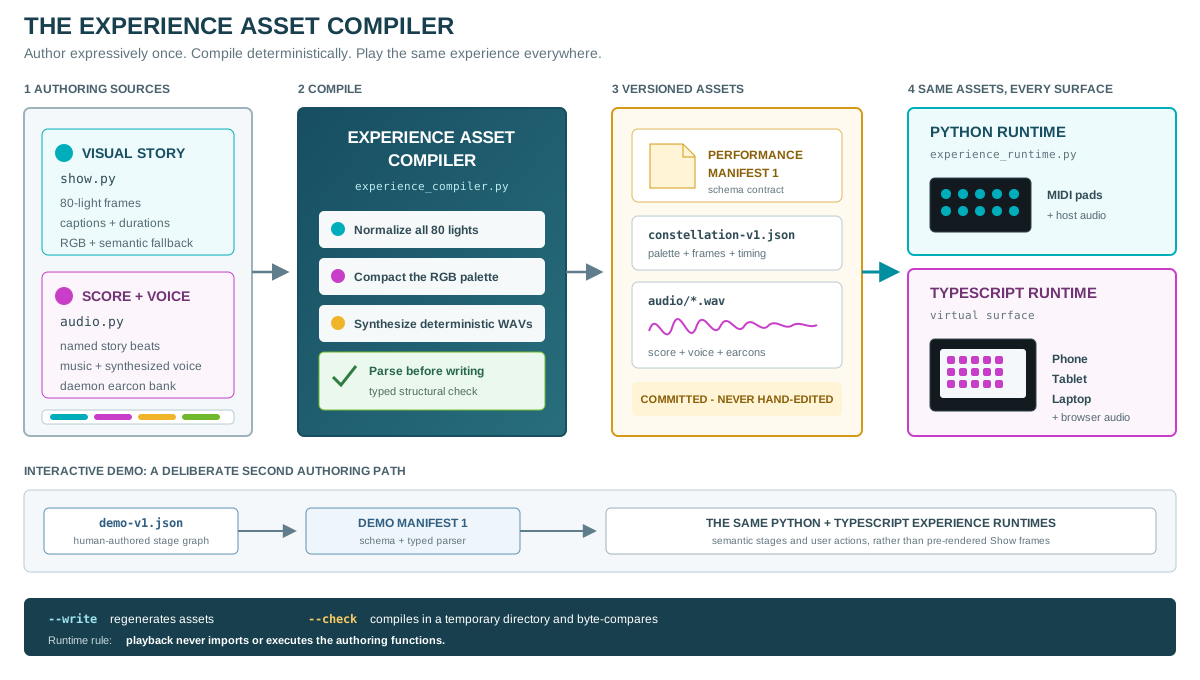
The experience asset compiler is a deterministic build boundary between creative authoring and runtime playback. It lets the Show use expressive Python while guaranteeing that physical and virtual surfaces receive the same committed frames and audio. Neither runtime imports the authoring functions.
| Role | Source of truth |
|---|---|
| Visual story, cue geometry, captions, and timing | show.py |
| Score, synthesized voice, and earcon definitions | audio.py |
| Deterministic compilation and asset comparison | experience_compiler.py |
| Generated Show contract | schemas/performance-manifest-v1.json |
| Committed source assets | web-app/public/experiences/constellation-v1.json and audio/ |
| Typed loading and structural checks | experience_manifest.py |
| Shared Python playback | experience_runtime.py |
| Browser playback | web-app/src/ using the same manifest and WAV files |
Performance Manifest 1 is compact by design:
| Field | Meaning |
|---|---|
version, name, rows, columns | Contract identity and surface dimensions. |
palette | Reusable colors, each with exact RGB and a semantic fallback. |
cues | Ordered act, caption, duration, and frame records. |
frame.grid | The 8x8 matrix as palette indexes. |
frame.top, frame.right | The two common eight-light outer rails as palette indexes. |
audio | Soundtrack asset, duration, reference tempo, and synchronization metadata. |
The published Performance Manifest Schema 1 is the editor, CI, and conformance contract. The compiler also loads its result through the dependency-free typed parser before writing it; live playback uses that parser rather than general-purpose JSON Schema validation.
After changing show.py or audio.py, regenerate and verify the source assets:
.venv/bin/python -m pad_lattice.experience_compiler --write
.venv/bin/python -m pad_lattice.experience_compiler --check
The browser build copies those source assets into the packaged Python web bundle. Rebuild it, then verify that its generated copy is identical:
cd web-app
npm run build
cd ..
.venv/bin/python -m pad_lattice.experience_compiler \
  --check --target src/pad_lattice/web_dist/play/experiences
--check compiles into a temporary directory and byte-compares every generated
file. CI runs both checks. Generated performance and audio files must never be
hand-edited.
demo-v1.json is the deliberate exception. It is a human-authored interactive
stage graph governed by Demo Manifest Schema 1,
not generated Show media. It still enters the same typed Python and TypeScript
experience runtimes, which prevents a second playback implementation.
Session Lease Path
Codex hooks know the real Codex session ID, but there is no terminal-close hook. The integrated launcher bridges that lifecycle gap:
pad-lattice codexcreates a random lease ID and startsSessionLease.- The lease connection sends its label and working-directory metadata.
- The launcher exports the lease ID and injects scoped lifecycle hooks into its child Codex process.
- The first lifecycle hook sends both the real Codex identity and lease ID.
- The daemon binds the lease to that identity and returns its Scene, accent, and label.
- The lease remembers the binding and includes it when reconnecting after a daemon restart.
- When Codex exits, the launcher closes the lease. The daemon removes the bound session immediately if no other live lease owns it.
Plain codex sessions load no Pad-Lattice hooks and remain outside the session
registry.
Execution Model
The daemon runtime uses one synchronous selectors loop. On each iteration it:
- expires terminal holds and stale unleased sessions;
- renders only when state is dirty or optional activity motion is due;
- handles readable Unix-socket clients;
- polls pending events from every enabled surface.
The default poll interval is 30 ms. The runtime supplies time.monotonic() to
each control-plane transition. Registry mutation, selection, routing, and
render scheduling happen in one thread, so the core needs no cross-thread
locking and policy tests can supply an exact clock.
Threads are confined to adapters that must wait independently:
BrowserSurfaceServerserves HTTP and WebSocket clients and places semantic events on a thread-safe queue for the daemon loop;SessionLeasereconnects in a background thread while Codex owns the terminal;codex-execwaits for a Stop action while its main thread consumes Codex JSONL;- a permission hook waits synchronously because Codex is waiting for that hook's decision.
Host audio uses short-lived operating-system player processes. Browser audio uses compiled WAV assets. Synthesis, playback, and browser autoplay state are outside the control plane and never block the selector loop.
State Ownership
| Data | Authority | Persistence |
|---|---|---|
| Sessions, selection, slots, subscriptions, leases | ControlPlane memory | None; reconstructed by live clients. |
| Preferred identity accent | IdentityStore | Bounded local LRU containing hashed identities only. |
| Codex hook commands | pad-lattice codex command line | Child process only; not persisted globally. |
| Device definitions | Profile catalog | Packaged JSON plus optional user profile roots. |
| Visual meanings | visual_protocol.py and documentation | Versioned as Visual Protocol 1. |
| Demo and Show artifacts | Packaged Version 1 manifests and generated browser WAV files | Committed, compiler-checked build inputs. |
Slots are presentation state, not identity. A session may move into or out of overflow while retaining its identity and preferred accent.
Failure Behavior
| Failure | Behavior |
|---|---|
| Daemon unavailable during a normal lifecycle hook | The hook remains a no-op for Codex; the agent session continues. |
| Daemon unavailable at launcher startup | Codex still starts and the lease retries once per second. |
| No surface permission response before timeout | The hook returns no decision and Codex restores its keyboard prompt. |
| Action subscriber disconnects | Its capabilities disappear and affected controls render dark. |
| Lease connection drops | The launcher reconnects with its remembered identity. |
| Leased process exits | Its session is removed immediately. |
| Unleased client disappears without cleanup | The session expires after the configured inactivity TTL. |
| Several MIDI ports or profiles match | Device resolution fails with a diagnostic instead of guessing. |
| Invalid protocol message | The daemon returns a protocol error on that client connection. |
| Browser fails authentication | It receives no surface state and must pair again. |
| Browser server cannot bind | Startup fails before the daemon claims normal operation. |
| Paired browser requests Demo or Show | Rejected; only the loopback administrator can start or stop experiences. |
| Agent needs approval or a reply during playback | Experience stops and authoritative agent state renders immediately. |
| One child surface fails to initialize | Composite initialization closes already-opened children. |
| Requested audio player unavailable | Explicit audio startup fails clearly; operation without an audio flag is unaffected. |
| Audio playback fails after startup | State, rendering, MIDI input, and action routing continue. |
| Clean daemon shutdown | Browser clients close; MIDI clears and returns to normal device mode. |
Where To Make Changes
| Goal | Start here | Primary tests |
|---|---|---|
| Add an agent backend | New adapter using PadLatticeClient and events.py | Adapter tests, test_client.py |
| Change session selection or routing | control_plane.py | test_control_plane.py, test_runtime_integration.py |
| Change a glyph or semantic color role | visual_protocol.py | test_visual_protocol.py, test_midi_grid.py |
| Change browser commands or rendering | web_protocol.py, web_surface.py, web-app/src/ | test_web_protocol.py, test_web_surface.py, Vitest, Playwright |
| Change multi-surface fan-out | devices/composite.py | test_composite_surface.py, test_daemon.py |
| Change an earcon or Show score | audio.py, then run the experience compiler | test_audio.py, compiler check, browser tests |
| Change the visual story | show.py, then run the experience compiler | test_show.py, manifest tests, real-device performance test |
| Change the guided Demo | web-app/public/experiences/demo-v1.json | manifest tests, test_demo_agent.py, Vitest, Playwright |
| Change browser Demo timing or pointer | web-app/src/demoPlayback.ts, DemoPointer.tsx | playback unit tests and public Demo Playwright tests |
| Change playground device layouts | VirtualSurface.tsx, StreamDeckSurface.tsx, shared surfaceModel.ts | playground-devices.spec.ts, public Demo Playwright tests |
| Change experience playback | experience_runtime.py | test_demo_agent.py, test_show.py, test_daemon.py |
| Add a palette-grid controller | A profile JSON file | test_device_profiles.py, guided profile test |
| Add a new hardware driver | devices/base.py, devices/factory.py, new trusted driver | Driver tests and profile validation tests |
| Change Codex lifecycle mapping | codex_hooks.py or codex_exec.py | Matching Codex adapter tests |
| Change socket or surface adaptation | daemon_runtime.py | test_daemon.py, test_runtime_integration.py |
| Change launcher cleanup or reconnect behavior | codex_session.py, lease handling in control_plane.py | test_codex_session.py, test_control_plane.py |
Adding a new state or action is intentionally cross-cutting. It changes agent semantics, daemon gating, the visual protocol, every conforming profile, tests, and documentation. Treat it as a protocol change rather than a local enum addition.
Minimal Agent Adapter
The runnable adapter example registers one session, requests approval, performs a small calculation only if approved, and reports the result. It uses the real daemon but needs no Codex, model API, or MIDI hardware.
From a checkout with Pad-Lattice installed, start a browser surface:
pad-lattice web
In another terminal:
.venv/bin/python examples/agent_adapter.py --label "Example adapter"
Use --socket PATH for another daemon. The example shows a connection-bound
session lease, a unique request ID, a one-shot action subscription, and cleanup.
Rejection or an approval timeout never runs the work. Replace sample_work()
with your backend's operation, not its authorization checks.
tests/test_adapter_example.py runs approval, rejection, timeout, and failure
paths against the real daemon.
Validate a Change
Run the hardware-independent suite:
.venv/bin/python -m unittest discover -s tests
.venv/bin/python -m pad_lattice.experience_compiler --check
For routing changes, run the focused integration suite:
.venv/bin/python -m unittest discover -s tests -p test_runtime_integration.py -v
It starts the real daemon, test agents on a temporary Unix socket, and authenticated browser connections on a random loopback port. It checks targeted and duplicate actions, withdrawn and replaced requests, competing surfaces, lease and browser reconnects, and Demo preemption. No MIDI hardware or Codex session is needed. The normal Python CI suite includes these tests.
Validate the documentation:
cd docs-site
npm run typecheck
npm run build
Validate the virtual surface:
cd web-app
npm run typecheck
npm test
npm run build
npm run test:e2e
The Playwright live_web_harness.py supplies controlled UI fixtures; it does
not test daemon routing. The integration suite above covers that boundary.
Neither replaces the physical device test needed to
verify a controller's actual buttons and LEDs.
Recommended Reading Order
- Architecture for system boundaries.
- Socket Protocol for client behavior.
- Multi-Agent Design for routing invariants.
- Visual Protocol for surface semantics.
- Browser Surface for browser transport and pairing.
- Audio Feedback for optional sonification.
- Device Profiles for hardware extension.